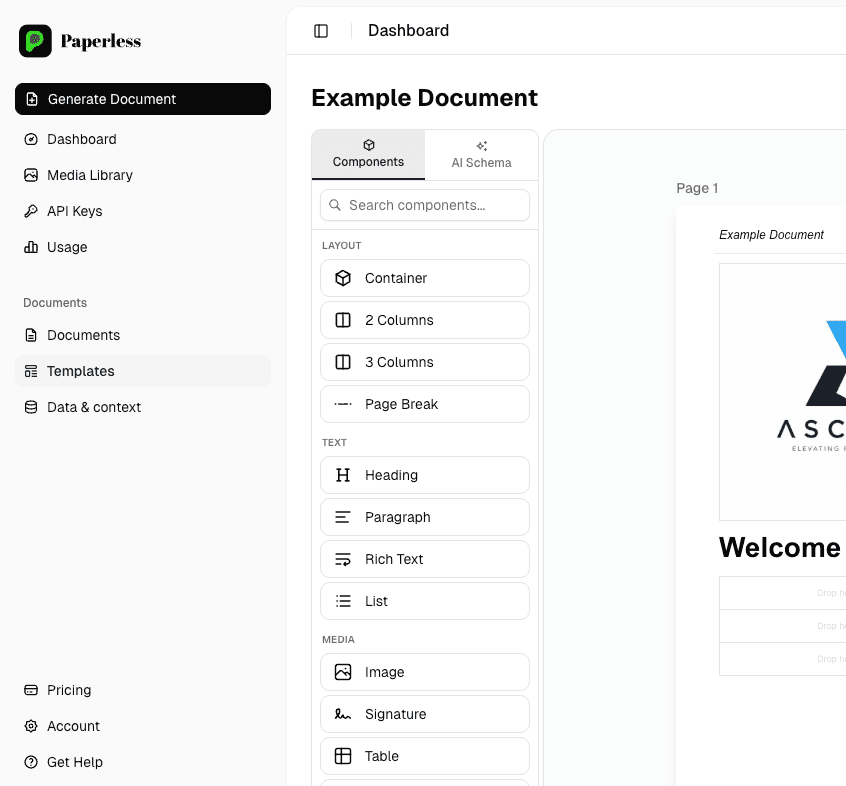
Generate PDFs from CSV or Google Sheets - one row, one document
If your data lives in a CSV or a Google Sheet and you need a PDF per row - statements, certificates, packing slips, training records - Paperless is built for exactly that. Map columns to template fields visually, hit generate, get a ZIP of branded PDFs back. No code required.
The CSV → PDF problem we hear weekly
- Hundreds of customer statements built monthly in Word from a sales export.
- Training certificates created one at a time after every course.
- Compliance briefs assembled per sub-contractor by HR.
- Investor / partner reports rebuilt manually from a quarterly CSV.
- No room to scale - every new customer means another row of typing.
How Paperless turns rows into PDFs
- Upload a CSV or connect a live Google Sheet.
- Map columns to template fields visually - no code, no scripting.
- Hit generate, get a ZIP (or webhook event) when the run finishes.
- Re-run a subset (e.g. just one customer) without re-uploading.
- Schedule recurring runs (e.g. monthly statements) via the API.
Every document automation we ship runs on Paperless - our in-house engine, also available as a standalone product. Generate 10,000+ branded PDFs per month from CSV, Google Sheets or your REST API. Free to start.
- Visual no-code template editor your team can edit without a developer
- REST API for on-demand generation from any system
- CSV / Google Sheets batch generation - 10,000+ docs per run
- Multilingual output (EN / LT / PL / +) from a single template
- Free tier - no credit card required
Common questions
Does it work with Excel files too?
+
Yes - upload .xlsx and .csv directly. For live data, connect a Google Sheet and Paperless reads the latest rows on each run.
Can column names be in any language?
+
Yes - Paperless preserves Unicode column names and content. We've shipped flows for Lithuanian, Polish and Russian data without issue.
Can I trigger a run from a Google Sheet button?
+
Yes - Paperless exposes a webhook URL you can call from a Google Apps Script trigger or any low-code tool.
How do I keep templates branded?
+
Templates are designed in the visual editor with your fonts, colours and logo. Your team can update the look without touching the data flow.
Related automation services
Bulk PDF generation
Generate thousands of branded PDFs at once - statements, invoices, certificates, reports - from CSV, Google Sheets or REST API. Paperless by Zeroflowers, free to start.
Learn morePDF generation API
Generate branded PDFs from your data via a REST API. Visual no-code template editor, CSV / Google Sheets batch, sub-second generation, free tier. Paperless by Zeroflowers.
Learn moreHR document automation
Automate HR document generation: employment contracts, training certificates, employee handbooks, compliance briefs. Multilingual from one source. Powered by Paperless.
Learn more