Automate Contracts in 4-6 Weeks: A Pilot Roadmap

Contract automation turns repeatable contract work into a predictable workflow that drafts, routes, signs and triggers downstream actions automatically. It cuts cycle times, removes manual data entry errors and creates an audit trail that satisfies compliance teams. The immediate next step is not a platform decision. It is picking one high-volume contract type - NDAs, standard order forms - and automating that single workflow first.
- Contract request from a CRM stage change, form submission or webhook
- Master template with conditional clauses and an approved clause library
- Approval thresholds, data residency rules and monthly contract volume
- Signed contract filed automatically, with no retyping between systems
- Structured obligation and renewal register you can actually query
- Audit log covering every generation, approval and signature event
The TL;DR
- Automating a high-volume contract type like NDAs or order forms saves real hours, and typically moves cycle times from weeks to days.
- Automate the full lifecycle only once one clear workflow is stable. Before that, intake and signature are the stages worth the effort.
- Integrate the CRM first - that's where contract requests originate. Webhooks, retries and logging are what stop failures and duplicates.
- Approval playbooks, role-based permissions and audit logs are what make an automated contract defensible rather than harder to defend.
- Start with one simple contract type and expand. That path gets to ROI faster and stalls far less often than an ambitious rollout.
What is contract automation, and when should you automate?
Agreement automation covers six distinct lifecycle stages: intake, generation, review and approval, signature, storage and extraction, and post-signature action. Most legal teams only automate one or two of these when they start, which is exactly the right instinct. Trying to automate the full lifecycle in one project is how pilots stall.
It helps to separate agreement automation from two things it often gets confused with. E-signature alone solves the signing step but leaves drafting, routing and data capture untouched. A basic contract lifecycle management (CLM) repository gives you storage and search, but if nothing feeds it automatically, someone still has to upload every finished agreement by hand. Genuine automation connects these stages so a contract moves from request to signed, filed document without a person retyping data at each handoff.
Not every contract type deserves this investment. You should automate when you see:
- High volume: dozens or hundreds of a single contract type per quarter, not a handful of bespoke deals.
- Multi-system touchpoints: the same data (client name, price, term dates) needs updating in a CRM, an ERP and a signed PDF.
- Renewal value at risk: contracts with auto-renewal clauses or obligations that get missed when nobody is tracking them centrally.
If your contract volume is low and each deal is genuinely unique, a template and a checklist may serve you better than a workflow build. Agreement automation guidance for 2026 backs this phased, selective approach over trying to automate everything at once.
What ROI can you expect from automating contracts?
The business case rests on three measurable gains: faster cycle times, fewer administrative hours, and cleaner data. Teams that shift from manual drafting to templated, workflow-driven generation typically see contracts reach signature in days rather than weeks, because the document no longer waits in someone's inbox for a spare hour.
High-volume contract processes see the clearest benefit, with organisations reporting notable reductions in administrative time and faster turnaround once manual drafting and routing come out of the loop (Glean's analysis of contract automation efficiency).
Build the business case around a small set of KPIs rather than a vague sense that things feel faster:
- Cycle time from request to signature, measured in days.
- Administrative hours spent per contract, before and after automation.
- Error rate: how often a wrong figure, name or clause makes it into a signed document.
- Renewal capture rate: the percentage of renewal-eligible contracts actually flagged and acted on.
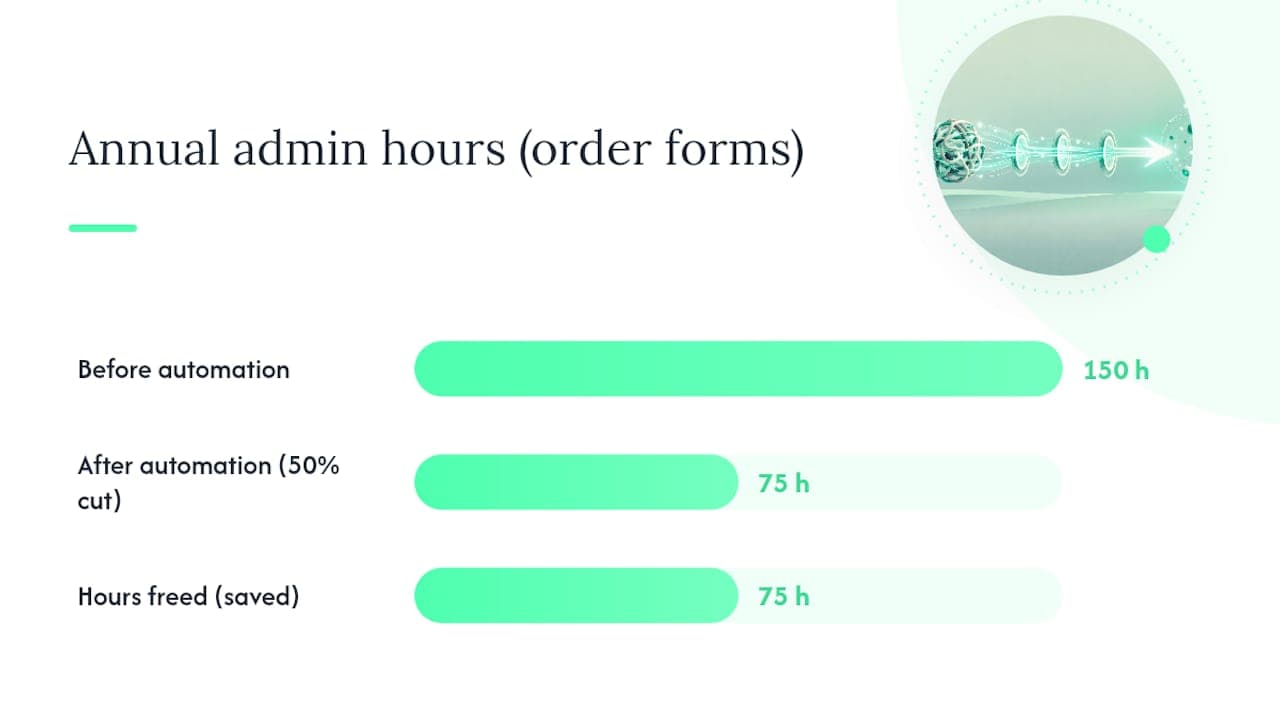
A simple calculation helps here. If your team processes 200 order forms a year and each one takes 45 minutes of manual drafting and chasing, that's 150 hours annually on one contract type alone. Cutting that by even half frees roughly 75 hours for higher-value work. Beyond the hours, shifting legal resource away from repetitive tasks also protects revenue, because obligations and renewal dates stop living in someone's memory and start living in a system that flags them automatically.
Which features actually make contract automation work?
Four capability categories separate a genuine automation system from a glorified template folder. Get these right and the workflow holds up under real volume; skip one and you will feel the gap within weeks.
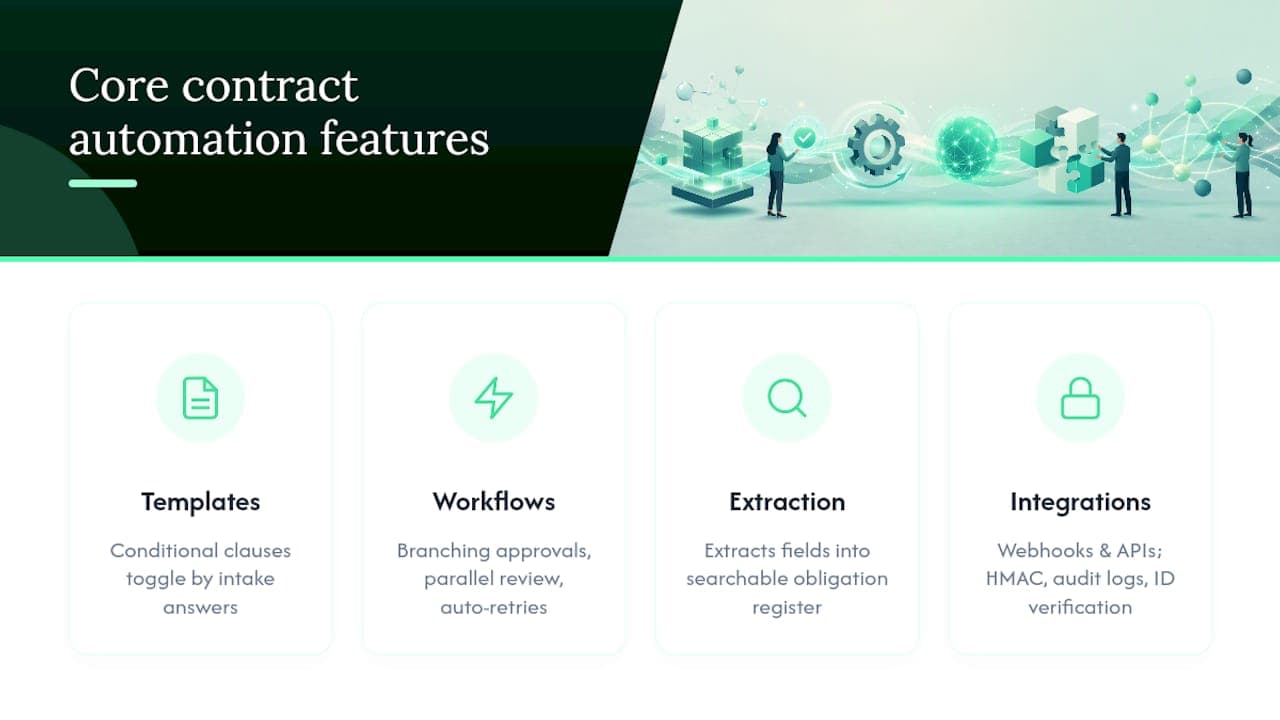
- Template engines and clause logic. A proper template engine lets you build one master document with conditional clauses that appear or disappear based on the answers given at intake. A UK client versus an EU client can trigger different liability wording automatically, with no one manually swapping paragraphs.
- No-code workflow builders. These handle branching approvals (finance signs off above a certain value, legal signs off on non-standard terms), parallel review when two departments need to approve simultaneously, and automatic retries when an approver doesn't respond in time.
- Agreement intelligence. The extraction layer: pulling structured fields like party names, dates and values out of a document and populating a searchable obligation register, so nobody has to open forty PDFs to find a renewal date.
- Integration and security features. Webhooks and APIs move data between systems, HMAC signing verifies that incoming events are genuine, audit logs record every action, and identity verification confirms who actually signed.
How do you build your first automated contract workflow?
Six phases take you from a manual process to a working pilot, and each phase has a natural stopping point where you check the work before moving on.
- Choose one pilot contract type. Pick something high-volume and low-complexity, such as NDAs or standard order forms, and define what success looks like before you build anything: a target cycle time, an error rate ceiling, a number of contracts to process in the trial.
- Map intake and author templates. Document exactly what data triggers a contract (a form submission, a CRM stage change) and build the master template with its conditional clauses. This is the slowest phase and the one teams rush, usually to their cost.
- Build the workflow itself. Add approval routing that matches your actual sign-off rules, not an idealised version of them, and connect the e-signature step at the end.
- Integrate your first system, starting with the CRM. This is where contract requests originate for most sales-driven businesses, so it earns priority over ERP or HRIS connections. Map every field carefully and secure the event flow with signed webhooks - the pattern we use on CRM integration builds.
- Pilot with real users on real contracts, not a sandbox test with fake data. Collect every error, every point of confusion, every manual workaround someone invents, and fix the workflow weekly rather than waiting for a big review.
- Scale once the pilot proves stable. Add agreement intelligence for reporting, connect additional systems, and only then consider agentic AI steps that make decisions rather than simply routing documents.
How a pilot becomes a production contract workflow
- 1Pick one high-volume contract type and set a target cycle time, error ceiling and trial volume.
- 2Map the intake trigger and author the master template with conditional clauses.
- 3Build approval routing that matches the sign-off rules you actually use, then attach e-signature.
- 4Connect the CRM first with signed webhooks, idempotency checks and retries.
- 5Run real contracts through it, fix weekly, and only then add extraction, reporting and more systems.
Which systems should you integrate first, and what breaks?
Connect systems in the order contract data actually originates, not in order of technical interest. For most commercial teams that means a CRM first (Salesforce, HubSpot or similar, since that's where deals and client data live), then ERP or billing platforms for pricing and invoicing accuracy, then HRIS if you're automating employment contracts, and finally procurement systems and document storage for indexing and retrieval.
Reliable event handling matters more than most teams expect at the outset. Build in:
- HMAC-signed webhooks so you can verify that an incoming event genuinely came from the system it claims to.
- Idempotency checks to stop duplicate contracts being generated when a webhook fires twice.
- Retries with backoff for when a downstream system is briefly unavailable.
- Central logging and monitoring so failures surface immediately rather than three weeks later when someone notices a missing signature.
The mapping problems that trip teams up are rarely dramatic. Legacy PDFs with no extractable text layer. Field names that differ between systems ("Client Name" in one, "Account" in another). Missing canonical identifiers, so the same customer exists as three separate records. Integration reliability is the hidden cost of contract automation, and it's usually where pilots quietly fail if nobody engineers for it from day one.
What governance and compliance checks does automation need?
Automating a workflow doesn't remove the need for oversight. It changes where that oversight lives, moving it from individual judgement calls into documented rules the system enforces consistently.
Build these into your governance framework before going live:
- Approval playbooks that state precisely which contract values or clause types trigger a human review versus an automatic pass.
- Role-based permissions so only the right people can approve, edit templates or override a workflow step.
- Data retention and PII handling rules, particularly for HR contracts containing sensitive employee data.
- Audit log requirements covering every generation, approval and signature event, with identity verification on the signature step itself.
Legal scholarship on automated processes consistently stresses formalised documentation of approvals as the foundation of defensibility (research on automation and governance). Without it, an automated contract is harder to defend than a manually signed one, not easier. The same evidence discipline we apply to compliance document automation applies here.
Escalate to legal review whenever a clause deviates from your standard library, the financial exposure crosses a set threshold, or a regulatory question arises that the workflow wasn't built to handle.
Trigger
- CRM deal stage change, intake form submission, procurement request or scheduled renewal date.
Systems / APIs
- CRM (Salesforce, HubSpot or similar) as the first and primary integration
- Template and generation layer for conditional clauses and batch output
- E-signature provider with identity verification on the signing step
- ERP / billing, HRIS and document storage connected only after the pilot is stable
Template fields
- counterparty_name, entity_jurisdiction, contract_type, contract_value
- term_start, term_end, renewal_type, notice_period_days
- clause_variant_id, approval_owner, approval_threshold_hit
- signature_status, signed_pdf_url, obligation_register_id, audit_log_url
Automation actions
- Generate the draft from a master template with conditional clauses
- Route to finance or legal only when a documented threshold is crossed
- Send for signature, then file the executed contract automatically
- Extract obligations and renewal dates into a searchable register
How do you measure success, and what does it cost?
Track a small, consistent set of KPIs rather than a sprawling dashboard nobody checks. The core five are cycle time to signature, the percentage of contracts fully automated versus manually handled, time saved per agreement, renewal capture rate, and error rate.
Realistic timelines matter for setting expectations with stakeholders. A single-workflow pilot typically takes 4 to 6 weeks from kickoff to live use. Building the integration spine (CRM, plus one other system) adds another 6 to 12 weeks. Full enterprise-scale rollout across multiple contract types and systems runs 3 to 9 months depending on complexity.
Budgeting depends on a few clear cost drivers:
- Integration complexity: connecting one CRM is far cheaper than connecting five legacy systems with inconsistent field names.
- Self-hosting requirements: businesses with strict data residency needs face higher setup costs but avoid ongoing per-task vendor fees.
- Contract volume: higher throughput justifies more investment in reliability engineering (retries, monitoring).
- Reporting depth: a basic obligation register costs less than full agreement intelligence with custom dashboards.
How we build and deliver automated contract workflows
We build custom document workflow automation for SMEs across the UK and EU, pairing self-hosted infrastructure (n8n, Temporal) with the Paperless PDF generator for template design and batch document creation. The self-hosted model matters for contract automation specifically, because it gives legal and ops teams full ownership of the workflow logic and the data flowing through it, without per-task fees stacking up as volume grows.
Clients typically report drastically less time spent on manual document preparation once a contract workflow moves from manual drafting to automated generation and routing, freeing legal and operations staff for review work rather than repetitive administration.
We integrate directly with the CRMs and spreadsheets already in use, so the intake mapping described earlier is built around systems your team already trusts rather than a replacement for them. Detailed client metrics and named results are available on request through the document workflow automation case studies page.
Why single-workflow pilots outperform ambitious rollouts
Teams that automate one contract type first, prove the metrics, and then expand almost always outperform teams that try to automate everything simultaneously. A narrow pilot reduces scope, delivers measurable ROI within weeks rather than months, and builds internal trust in the system before you ask anyone to rely on it for higher-stakes agreements.
On AI specifically: treat AI agents as constrained participants in a workflow, not orchestrators of it, at least early on. Let AI extract fields and flag anomalies. Don't let it make approval decisions until the workflow has run cleanly for months.
Before going live, check three things: your intake data is clean, your approval rules are documented rather than assumed, and someone owns monitoring for the first month.
Ready to automate your next contract workflow?
We build the exact kind of single-workflow pilot this article recommends: drafting one contract type, wiring it to your CRM, and getting it live within weeks rather than quarters. The difference from a generic automation platform is ownership - self-hosted workflows with no per-task fees, so your contract volume can grow without your costs climbing alongside it.
That matters most for SMEs needing bespoke integrations, or with data residency requirements that rule out third-party hosted platforms. The contract automation page walks through how the Paperless generator handles templates, conditional clauses and batch generation.
Where to go next
If you're ready to pick your pilot contract type, book a free 30-minute audit and we'll map out the first build with you.