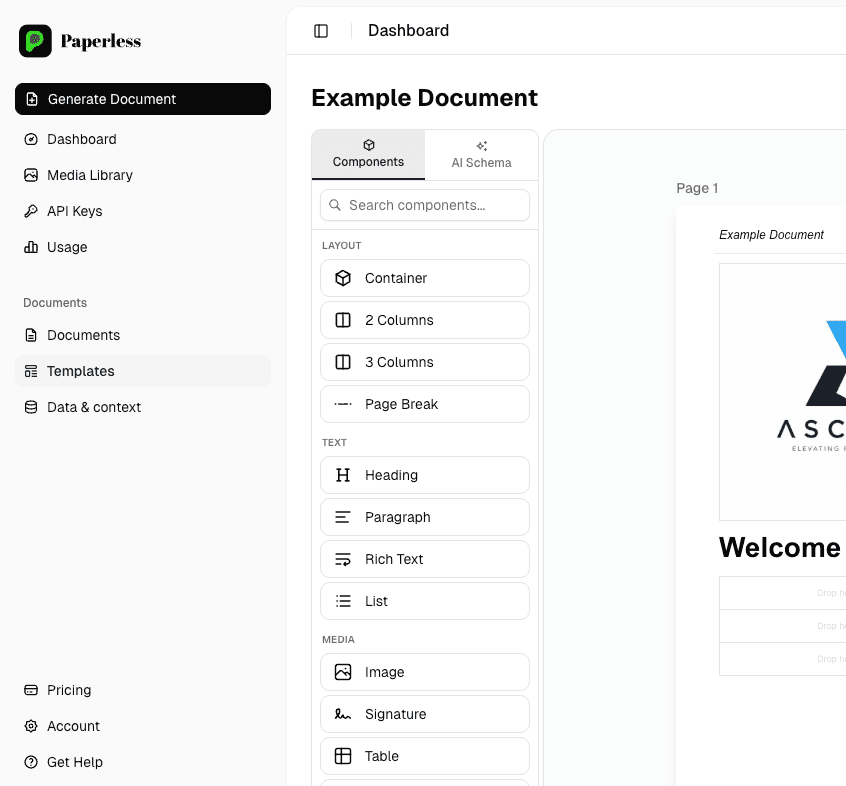
Bulk PDF generation: 10,000+ branded documents per run
If your team is rebuilding the same monthly statement, certificate or report by hand for hundreds of customers, you need bulk PDF generation. Paperless takes a CSV or Google Sheet and produces 10,000+ pixel-perfect, branded PDFs in a single run - on schedule or on demand.
What bulk PDF generation actually replaces
- End-of-month statements built one-at-a-time in Word or Excel.
- Per-customer compliance briefs and audit packs assembled by hand.
- Bulk certificate runs after every training course.
- Investor or partner reports rebuilt from a CSV every quarter.
- Mail merges that break silently and lose customers' line items.
How Paperless handles bulk
- Upload a CSV or connect a Google Sheet - one row = one PDF.
- Visually designed templates, locked to your brand.
- 10,000+ docs per batch, generated in parallel.
- Per-row error handling: bad data is reported, not silently merged.
- Webhook + downloadable ZIP when the run finishes.
Every document automation we ship runs on Paperless - our in-house engine, also available as a standalone product. Generate 10,000+ branded PDFs per month from CSV, Google Sheets or your REST API. Free to start.
- Visual no-code template editor your team can edit without a developer
- REST API for on-demand generation from any system
- CSV / Google Sheets batch generation - 10,000+ docs per run
- Multilingual output (EN / LT / PL / +) from a single template
- Free tier - no credit card required
Common questions
What's the maximum batch size?
+
The free tier handles thousands per batch; paid tiers handle 10,000+ per run. For bigger volumes (millions/month), we offer a self-hosted deployment.
How long does a 10,000-PDF run take?
+
A typical 10,000 PDF batch on hosted Paperless runs in 5-15 minutes depending on template complexity. We notify you via webhook when it's done.
Can the source data come from anywhere?
+
CSV upload, Google Sheets connection, REST API push, or scheduled pull from your own database. We integrate where you keep your data.
What if some rows have bad data?
+
Bad rows fail explicitly with a clear error report - they don't silently produce broken PDFs. You can re-run only the failed rows after fixing the data.
Related automation services
PDF from CSV / Google Sheets
Turn a CSV or Google Sheet into thousands of branded PDFs - statements, certificates, invoices, reports. Visual no-code template editor. Free tier, REST API.
Learn morePDF generation API
Generate branded PDFs from your data via a REST API. Visual no-code template editor, CSV / Google Sheets batch, sub-second generation, free tier. Paperless by Zeroflowers.
Learn moreDocument automation
Automate generation of contracts, certificates, reports, proposals and statements from your data - at scale. REST API, CSV batches and a no-code template editor.
Learn more